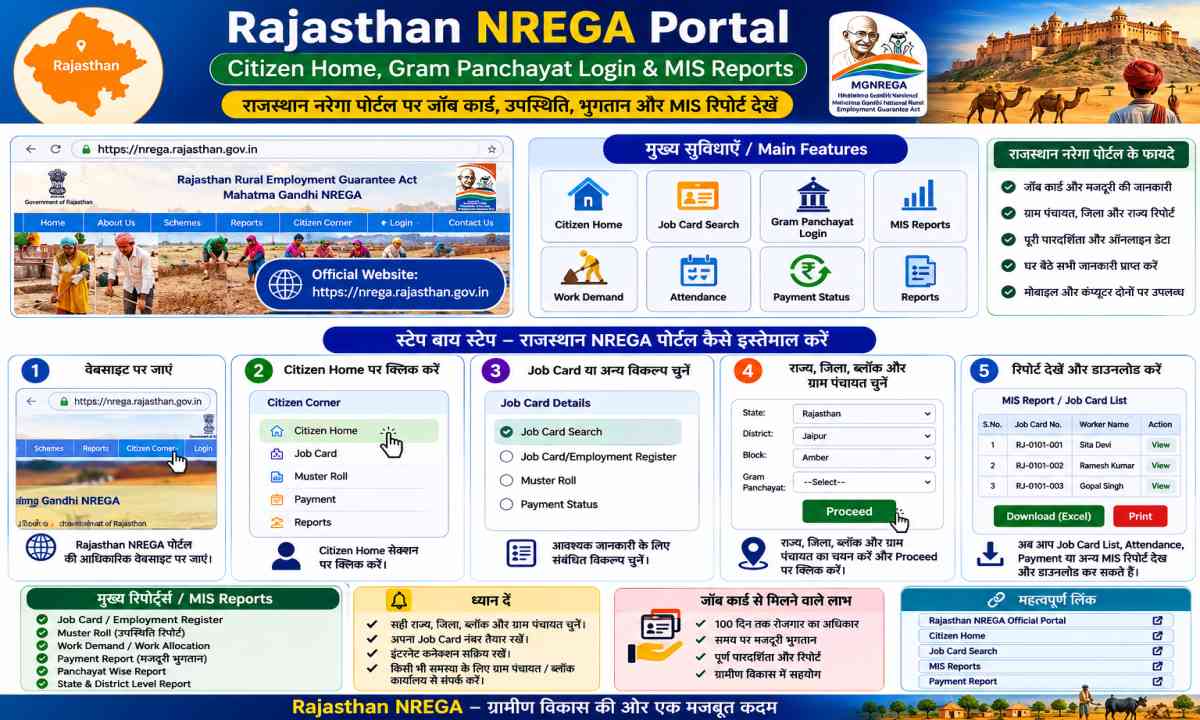
Rajasthan NREGA Portal – Citizen Home, Gram Panchayat Login & MIS Reports
MGNREGA Rajasthan (state_code 27) की official citizen home page aur Gram Panchayat Module login की पूरी guide — Job Cards, Muster Roll, Works, FTO, 33 districts और सभी MIS report categories एक ही जगह। घर बैठे अपने Gram Panchayat की reports देखें।
पूरा रास्ता एक नज़र में — ↓ इस तरह आगे बढ़ें
हर box एक step है। नीचे दिए ↓ symbol का मतलब है "अब आगे यहाँ जाना है"। इसी क्रम में चलेंगे तो कोई step नहीं छूटेगा।
Official Citizen Portal खोलें
पहले Rajasthan का आधिकारिक NREGA citizen homepage (homestciti, state_code 27) खोलें — यही पूरी यात्रा का शुरुआती point है।
Step 1 पर जाएँ ↗Financial Year चुनें
Portal के dropdown में अपना Financial Year select करें (उदाहरण: 2026-27 या जिस साल की report देखनी है)। साल नहीं बदला तो नीचे कोई report नहीं खुलेगी।
Step 2 पर जाएँ ↗अपना District चुनें
राजस्थान के 33 districts में से अपना district चुनें। District की list ऊपर दी गई है — जैसे Jaipur, Jodhpur, Udaipur, Bikaner आदि।
Step 3 पर जाएँ ↗Block → Panchayat चुनें
District खुलने के बाद Block और फिर Gram Panchayat चुनें। गांव/पंचायत level की जानकारी यहीं से शुरू होती है।
Step 4 पर जाएँ ↗Report category चुनें
अब MIS Reports में से अपनी ज़रूरत की category चुनें — Job Cards, Muster Roll, Works, FTO/Payment, Grievance या Fund Management। पूरी list ऊपर दी है।
Categories देखें ↗Report खोलें / Download करें
चुनी हुई report के "Open/View" पर click करें। Report screen पर Print या PDF/download का option मिलेगा — अपने पास save कर लें।
Reports Open करें ↗Rajasthan NREGA Citizen Home
State At a Glance, 33 districts, MIS reports (Accounts/eFMS, FTO, Employment, Works, Fund, Grievance) और State Level Logins — सब यहीं से। Financial Year select करके reports खोलें।
GP Module LoginGram Panchayat Reports Login
Gram Panchayat Module (MGNREGA Act) — State=RAJASTHAN, Financial Year, District, Block और Panchayat select करके Job Cards, Muster Roll aur Works reports देखें।
Apna Vibhag GuideState Report Guide
सभी States & UTs की NREGA/VB-GRAMG reports और मुख्य संकेतकों की हमारी state-wise guide।
Rajasthan ke 33 Districts — NREGA Portal
Citizen portal (state_code 27) पर Rajasthan के सभी 33 districts listed हैं। कोई भी district, block या panchayat चुनकर उसकी NREGA reports देखी जा सकती हैं।
- 01 Ajmer
- 02 Alwar
- 03 Banswara
- 04 Baran
- 05 Barmer
- 06 Bharatpur
- 07 Bhilwara
- 08 Bikaner
- 09 Bundi
- 10 Chittorgarh
- 11 Churu
- 12 Dausa
- 13 Dholpur
- 14 Dungarpur
- 15 Hanumangarh
- 16 Jaipur
- 17 Jaisalmer
- 18 Jalore
- 19 Jhalawar
- 20 Jhunjhunu
- 21 Jodhpur
- 22 Karauli
- 23 Kota
- 24 Nagaur
- 25 Pali
- 26 Pratapgarh
- 27 Rajsamand
- 28 Sawai Madhopur
- 29 Sikar
- 30 Sirohi
- 31 Sri Ganganagar
- 32 Tonk
- 33 Udaipur
Gram Panchayat Module Login से Reports कैसे देखें
GP Login page (loginframegp.aspx, page C) Gram Panchayat Module के लिए है — राज्य, financial year, district, block और panchayat select करके reports खुलती हैं। Safari/Chrome/Edge सभी ब्राउज़रों पर चलती है।
GP Module खोलें
mnregaweb2.dord.gov.in पर loginframegp.aspx login page खोलें (lflag=eng, page=C, state_code=27)।
State + FY चुनें
State: RAJASTHAN चुनें और Financial Year select करें (2026-27, 2025-26, 2024-25, 2023-24, 2022-23, 2021-22)।
Location चुनें
District, Block और Panchayat ड्रॉपडाउन से चुनें — जैसे Jaipur → Amber → कोई भी GP।
Report खोलें
Job Cards, Muster Rolls, Works – प्रकार चुनकर report view करें या print करें।
MIS Reports — कौन सी Report कहाँ मिलेगी
Citizen Home page पर MIS Reports section में ये सभी categories मिलती हैं। हर category में आगे और sub-reports खुलती हैं।
Accounts & eFMS
DSC Solution, eFMS / FTO Status Report, Daily FTO Status, Delayed Payment – FTO, FTO Pendency & Reconciliation Core, Worker Account Verification, eFMS Steps… ABPS payment tracking का आधार।
Performance Monitoring
State/District/Block level performance indicators — labour budget, person days, HH employment, target vs achievement की monitoring रिपोर्ट।
Alert / Urgent Alerts
Delayed Payment Alerts, Anticipated Expenditure, Continuity Alerts — जहाँ payment में delay या budget pressure दिखे वो GPs alert होती हैं।
Transparency & Accountability
Job Cards, Muster Rolls, Works – citizen के लिए transparency reports। SOC (Summary of Completion), social audit documents यहीं से देखें।
Public Grievance Redressal
Lodge Grievances, Check Grievances Status, Complaint Register, Public Grievance Report — मजदूरों की शिकायतें दर्ज करने और उनकी स्थिति चेक करने की सुविधा।
Employment Provided
Employment Provided (Summary/Section 3), 100 Days Employment, Age Wise Registration, Verification of Job Cards, Employment Progress Report — '100 days kaam paane' की proof रिपोर्ट।
Works
Work Status (Section 3/4), Assets Created, BNRGSK Progress, Work Progress & Geo-tagging — rajya me works की पूरी स्थिति, assets aur geoMGNREGA data।
Fund Management
Financial Statement (New), Labour Budget, Outlays & Outcomes, Flow of Funds, Labour/Material ratio — NREGA funds कहाँ और कैसे खर्च हो रहे हैं।
Data Status
Online Data Status, Entry Status, Personal Details Count — डेटा entry की progress और कितनी जानकारी online है।
State Level Logins
Data Entry (nregade4.dord.gov.in), Generation of FTO by Accountant, Approve FTO to Bank by State Nodal Officer, Move FTO to PFMS for Payment — अधिकारियों के dedicated login।
FTO Payment Workflow — Full Procedure
Rajasthan में मजदूरी की payment FTO (Fund Transfer Order) के through होती है। ये 4 चरणों में move करती है:
Data Entry Login
मजदूरों का मस्टररोल enter किया जाता है और Accountant द्वारा FTO generate की जाती है। जॉबकार्ड से wages का मिलान ही FTO का आधार है।
DSC Approval (Accountant → Bank)
FTO पर DSC (Digital Signature) लगती है — यहाँ payment की details final होती हैं।
Approve FTO to Bank (State Nodal Officer)
State Nodal Officer FTO को अपनी ओर से approve करता है।
Move FTO to PFMS for Payment
आखिर में FTO PFMS में भेजी जाती है, जहाँ से bank account में पैसा जाता है। FTO Status / Daily FTO Status report से रोज़ाना की payment status देखें।
Related Articles — पूरी MGNREGA/VB-GRAMG Series
NREGA portal से जुड़ी हमारी बाकी guides भी पढ़ें:
ये Guide कैसे Use करें
सबसे पहले ऊपर दिया Citizen Portal card खोलें और अपने district पर click करें — वहाँ से block aur panchayat select करके Job Cards, Muster Roll और Works की official reports खुल जाएँगी। अधिकारियों को payment देखनी है तो Accounts & eFMS aur State Level Logins categories उपयोग करें।
अक्सर पूछे जाने वाले सवाल (FAQ)
MGNREGA Rajasthan का official portal कौन सा है?
Citizen portal: homestciti.aspx?state_code=27 और Gram Panchayat module login: loginframegp.aspx?page=C (दोनों mnregaweb2.dord.gov.in पर)।
Rajasthan के NREGA Job Cards कैसे देखें?
GP Module open करें → State=RAJASTHAN + Financial Year चुनें → District, Block, Panchayat select करें → 'Job Cards' report खोलें। Muster Roll और Works की रिपोर्ट भी इसी login से मिलती है।
Rajasthan में NREGA की मजदूरी कब मिलती है?
MGNREGA Act के अनुसार wages मस्टररोल के बाद payment की date से 15 दिनों के भीतर देना अनिवार्य है। Delay पर राज्य को compensation (wages + 0.05% daily) देना होता है। FTO pendency रिपोर्ट से delays track करें।
GP Login पर password/OTP करने को कहा जा रहा है?
यह फर्जी/फिशिंग है। Official GP module कोई password नहीं माँगता — report सिर्फ़ State/FY/District/Block/Panchayat चुनकर खुलती है। अगर कोई page login माँगे तो उसे bada अधिकारी/login link hi use करें, कहीं और credentials ना डालें।
क्या यह साइट सुरक्षित है?
हाँ — mnregaweb2.dord.gov.in भारत सरकार (DoRD/NIC) की official domain है। हमेशा URL के शुरू में mnregaweb2.dord.gov.in या nrega.nic.in की जाँच करके ही आगे बढ़ें।
मुझे पैसा नहीं मिला तो क्या करें?
पहले Citizen portal की FTO Status / Accounts-eFMS report में अपना मस्टररोल देखें, फिर GP/Block/DRDO से जाँच कराएँ। शिकायत के लिए Public Grievance section में Lodge Grievances करें या ज़िला अधिकारी से संपर्क करें।